
Top 12 On-Page SEO Practices for Your WordPress Site
Are you struggling to get your blog post or site page to rank on Google?
You must be feeling bad that your content is not doing well. Often, it is not your content’s fault. It is just that your content or structure is not optimized for the on-page SEO.
You don’t have to be an expert in SEO to do the on-page optimization. You just need to have a basic knowledge of SEO and a checklist that you can blindly follow.
Stick with us till the end, as a reward, you’ll be getting that checklist. On top of that, you’ll also learn how to use an SEO plugin efficiently, how to write the first content, and a simple process that will help improve both your readability and rankings.
- Getting a Good SEO Plugin for Your WordPress Site
- How to Write for People and Not Search Engines
- On-Page SEO Practices for Your WordPress Site
- 1. The Importance of H1 Heading in the on-page SEO
- 2. How to Optimize the URL Slug of a Page
- 3. SEO Title Optimization of a Blog/Page
- 4. The Importance of Meta Description
- 5. Sub-Headings Role in Your Content
- 6. Keywords in Your Content
- 7. Image “alt” Tags Optimization
- 8. Assigning Taxonomies to the Pages/Posts
- 9. Efficient Usage of the SEO Plugins
- 10. EEAT and Trust Building
- 11. Core Web Vitals and Page Experience
- 12. AI Optimization and Future Ready Content
- Additional On-Page SEO Tips You Don’t Want to Miss
- FAQs
- Conclusion
Getting a Good SEO Plugin for Your WordPress Site
As a starter, let’s begin with getting a good SEO plugin for your WordPress site. This will supplement your on-page SEO efforts.
These plugins will inherently provide you with an on-page SEO checklist. In the beginning, it might sound too good to be true. But there is always some downside to something that’s really good.
You cannot totally trust these plugins because they don’t have a human reviewing the content you’re writing from the backend. You have to be wary of the changes that are suggested by the plugin. Make changes that you think are valid and ignore the ones that you think are not.
In order to have that capability of understanding what you must follow and what you must not, you should have a basic understanding of SEO (which will be covered in the upcoming sections).
A couple of really good on-page SEO plugins that we personally suggest are YoastSEO, All in One SEO Pack, RankMath, and SEOBreeze. We’ve personally tried and tested them. Out of the zillions of options available in the market, we found them to be the best.
How to Write for People and Not Search Engines
You’ll find a lot of warnings on the internet to write content for people and not for search engines. However, once you have written reader-friendly content, it is okay to run it through an SEO plugin.
You may be surprised to find how minor tweaking could not only make your site suitable for the search engine but also improve your readability score, thus extending a better experience to your readers.
It doesn’t matter what drafting tool you use. Whether you draft in WordPress, with a word processor, or with blog authoring software. Create your content first, and write for your #1 fan persona.
Spend time on your headlines to communicate the value of your post at a glance.
- Outline your first draft
- Edit ruthlessly. Break up the content
- Save your draft to WordPress
- Now use the WordPress SEO plugin to optimize
A good SEO plugin takes care of several key on-page SEO optimization parameters. It suggests changes to improve your content in these critical areas.
Must Read: The Ultimate Buyer Keywords Guide for More Sales
In order to implement the recommendations suggested by the plugin, you must understand the different fields that the plugin suggests changes in.
Once you learn this process, you can implement it within 10 minutes for each blog post and increase your blog traffic over time.
On-page SEO checklist – The first thing is to make sure you resonate with your #1 fan persona. Then go through this checklist to make sure your target keyword is well represented on the page.
On-Page SEO Practices for Your WordPress Site
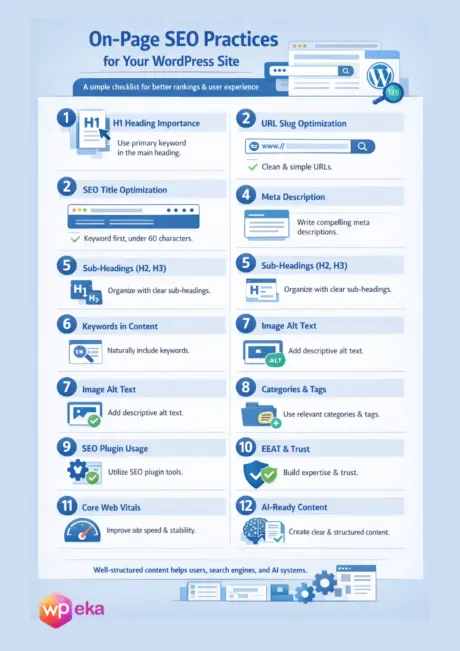
Let’s look at the 12 best on-page SEO strategies (or checklist) that we’ve managed to compile in simple words.
1. The Importance of H1 Heading in the on-page SEO
This is the part that shows at the top of your page content in big bold letters. This is also the part that shows up in your blog snippets, RSS feeds, and so on.
The heading is where you attract clicks, and attracting clicks is at least half the battle. You can get an essence of how important this is for your site. Let’s see how you can write the best title for your page or blog:
- Try making use of your primary keyword in the heading. You don’t necessarily have to use the exact word; you can make use of a different combination if you think the word can be seamlessly blended into the title.
- Ensure the primary keyword you’re using has a high search volume with low keyword difficulty.
You can afford to ignore the other SEO optimization advice. But you cannot afford to ignore your headlines. Otherwise, you lose out on a lot of readership at this point itself.
2. How to Optimize the URL Slug of a Page
This will be the ultimate stripped-down version of your headline. Set your URL to be just your keyword if possible, minus any “stop words.”
Stop words are words that a search engine will ignore, that is, a search engine will not take note of, eg, “the”, “to”, “of”, “a”, etc. If you notice carefully, they’re basically your prepositions, conjunctions, and pronouns that you learned in your english grammar.
Ideally, you will have to set up your site to have “pretty permalinks.” Here is Yoast’s definitive guide on changing your WordPress permalinks.
3. SEO Title Optimization of a Blog/Page
This will be a stripped-down version of your headline, which shows at a glance what your content is about. This shows in the search engine snippet, as well as in the browser tab.
The best practice is to put your target keyword as close to the beginning as possible. I often hit the “generate SEO title” button and edit it from there.
A keyword is definitely important. But its placement is crucial too.
Also, ensure that you keep your character count limited to 60 characters. If you exceed it, it will show a trimmed version on the SERP. It can reduce the number of clicks coming to your site.
4. The Importance of Meta Description
This, along with your URL slug and SEO title, makes up your search engine snippet, which the WordPress SEO plugin shows you within the post editor.
This is the ultimate example of writing for people! Google doesn’t give you page rank based on your meta description, but it does send you more traffic because a good meta description invites more clicks. Be sure your keyword is in there, because keywords are bold in the search results.
Essentially, a meta description is your sales pitch. Including a keyword is a good way to prompt more clicks. SEO wise, this field does not add any value. However, if you get more traffic, your SEO score improves automatically.
Also, ensure that you keep it under 160 characters so it does not get truncated in the search results.
5. Sub-Headings Role in Your Content
These are the H2 and H3 tags that break up your post into subsections. Make sure they flow with your outline and also contain your primary keyword whenever it makes sense and still flows naturally.
This will help with formatting and form a good structure for your content, with a clear hierarchy. Try keeping it conversational while maintaining a good flow from section to section.
6. Keywords in Your Content
Review your content for vague references to your main keyword/topic—“this, it, that, they, etc.”—and replace them with your keyword. As long as it sounds natural, adding relevant keywords will improve both your SEO and the quality of your writing.
The WordPress SEO plugin will check your “keyword density” so you don’t have to worry about counting words. This is where I usually stop optimizing and call it good enough.
7. Image “alt” Tags Optimization
If you use images, you may want to insert your keyword into the alt tag. Search engines can’t see images, but they can see alt tags, so it can help to take advantage of that. When you upload a new image into a WordPress blog post, the alt tag appears as “Alternate Text.”
8. Assigning Taxonomies to the Pages/Posts
The Tags and categories that you assign to either a post or a page on your WordPress are called taxonomies.
Add a post to a single category that encompasses the keyword topic. Assigning a single category to a post eliminates any confusion that a search engine could feel.
Add appropriate tags, if you use tags at all. When in doubt, go without. You can always add tags later.
(Tags don’t help your on-page SEO, but they can help with “related content” plugins.)
WordPress categories and tags do not directly help SEO, but they certainly help in making the site user-friendly and easy to navigate.
9. Efficient Usage of the SEO Plugins
The WordPress SEO plugin will give your post an SEO score and check your work for you.
If you are able to score green for your post, you can assume that search engines will be able to understand what your post is about. Anything above 60% is perfectly fine.
At some point, optimizing on the recommendations of a plugin will start to sound unnatural.
10. EEAT and Trust Building
EEAT stands for experience, expertise, authority, and trust. It helps search engines decide if your content deserves any visibility. As a writer, you should share real experiences and practical insights to show the reader that you are aware of the topic.
You should explain your ideas clearly and avoid complex language. It will help the reader go through your content easily. If you add a lot of Oxford-level vocabulary, you can’t gauge the reader’s attention. Simply write the way I am writing right now.
Build authority by publishing helpful content on the same subject regularly. It will grow trust because your site will start looking transparent.
These signals help search engines understand that your site provides real value and deserves better rankings.
11. Core Web Vitals and Page Experience
Core Web Vitals focus on how users experience your website. It is a no-brainer that a fast-loading page can retain visitors well.
You, as a person building a page, should ensure a few things in order to make the page load quickly. Things like compressing images, using simple layouts, and avoiding heavy scripts.
Your site should be in a state to respond quickly when users click or scroll. Minimizing the pop-up on the page can also help. You see, too many pop-ups or banners can hurt this experience.
Another key thing is that the content shouldn’t jump around while loading. This i technical jargon called Cumulative Layout Shift. This should also be green.
You can check the page performance in multiple sites like GTMetrix, Page Speed Insights, or Lighthouse. Then, optimize the page based on the findings you receive from those sites. You might also require a helping hand from your developer friends. Don’t hesitate to take help, you’ll need it.
12. AI Optimization and Future Ready Content
AI optimization means making your content easy to understand for both users and modern search systems. Write in a clear and logical way with simple headings and short paragraphs.
Focus on answering real user questions instead of forcing keywords. Be specific and direct when explaining ideas. Well-structured content helps AI systems summarize and recommend your pages. Update your content often to keep it fresh and relevant.
Use internal links to connect related topics. When your content is clear, helpful, and organized, it performs better across search results and AI-driven experiences.
Additional On-Page SEO Tips You Don’t Want to Miss

Revisit your headline. You may have fine-tuned your content in this process. See if you can fine-tune your headline accordingly. You must write the headline first. And then start working on the article. Doing otherwise is bound to generate really mediocre content.
The most important factor when blogging for SEO is to attract clicks with your headline. The headline accounts for about 50% of your blog post’s effectiveness.
Over-optimizing SEO is a waste of time because it distracts from higher-impact activities like producing more value-rich content and promoting the content you already have.
Keep in mind, an optimized piece of crap is still a piece of crap. If it turns out your blog post is a stinker, don’t sweat it. Just cut it loose, and be glad you didn’t spend a lot of time optimizing it.
Another tip is to focus on search intent instead of chasing every keyword variation.
Before publishing, ask yourself what the reader actually wants to achieve after landing on this page. If your content clearly solves that problem, it will naturally perform better.
Also, do not forget internal linking. Linking to relevant articles on your own site helps readers discover more useful content and keeps them engaged longer.
It also helps search engines understand the structure of your site and the importance of key pages. A few well-placed internal links can quietly boost both user experience and SEO without any extra effort.
FAQs
On-page SEO is everything you do on your own website, like content headlines, keywords, internal links, and page speed. Whereas, off-page SEO is what happens outside your site, like backlinks, brand mentions, and trust signals from other websites.
Good on-page SEO tools help you stay organized and avoid mistakes. Tools like Yoast, AIOSEO, Rank Math, Google Search Console, and PageSpeed Insights are simple and effective for daily use.
ChatGPT can help with content ideas, outlines, keyword usage, and rewriting content clearly. But it cannot replace strategy tools or real data, but it is very useful as a writing and planning assistant.
Common mistakes include:
Keyword stuffing
Weak headlines
Ignoring page speed
Skipping internal links
Writing content without a clear intent
Check if your pages are getting impressions, clicks, and time on page. You can check for it in the Google Search Console. If the user engagement on the site is good, i.e., users stay, read, and take action, your SEO is likely working in the right direction. You can check in Google Analytics 4.
Conclusion
We’ve unpacked quite a bit today. We’ve delivered the ultimate SEO checklist as promised. I hope you found this article helpful.
Now let’s quickly revise the key takeaways:
- Write for people, not search engines
- Headlines drive most clicks
- SEO plugins help, but do not replace quality
- User experience beats over optimization
Always ensure that you have these guidelines in your head while building a new page, structuring an existing page, writing a blog, or updating an existing one. This handy checklist will always ensure that your website pages beat the competition and rank well.
If you liked reading this article, you should also consider going through the following.
Leave a Reply