
Cost Calculator Builder Review: What It Is & How It Works

As someone who’s used WordPress a lot, building sites that offer services, quotes, or custom products, I often need a quick way for visitors to calculate price estimates without manually creating complex forms or hiring developers.
I came across Cost Calculator Builder, which claims to let you build cost-estimation forms and calculators easily, even for variable products, with no coding skills required.
I was curious if it really delivers a flexible, easy-to-use solution and whether it’s robust enough for real-world use.
So here is my review of Cost Calculator Builder.
What Is a Cost Calculator Tool?
A cost calculator tool allows website visitors to enter a few details and instantly get a price estimate. This is incredibly useful for:
- Service providers
- Custom product sellers
- Booking-based businesses
- Agencies needing instant quotes
Cost Calculator Builder helps you create these calculators without coding, using a drag-and-drop interface, formulas, conditional logic, and full customization.
First Impressions: Clean and Intuitive
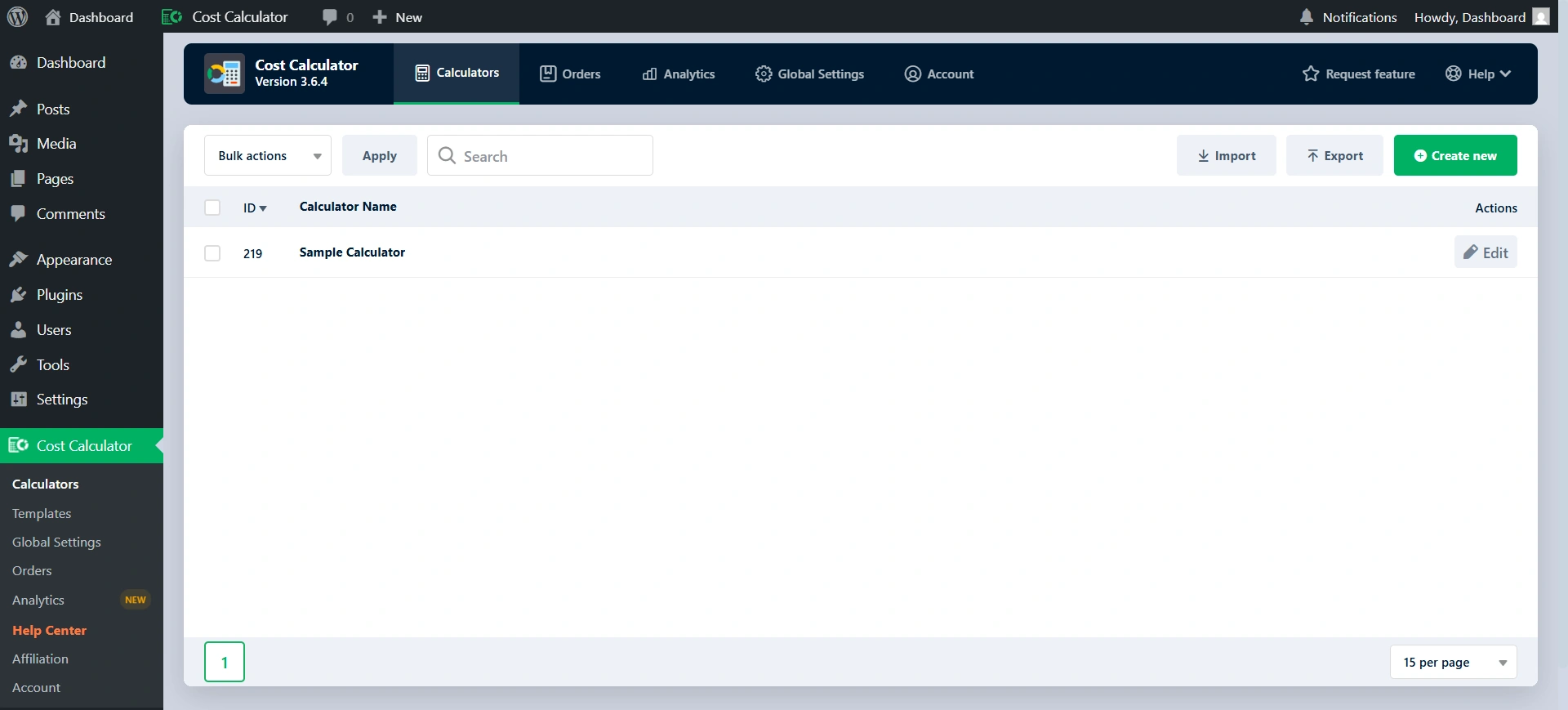
When I first saw the Cost Calculator Plugin, the interface was what stood out to me most. Compared to some of the other WordPress builders that I’ve seen which feel awkward and outdated, this plugin uses an easy-to-use drag and drop calculation builder, that is really straightforward in my opinion.
Setting up calculations, even if they are very complex, is simple with this plugin; you do not have to be a programmer to do it. You just assign letter variables to the inputs you want to create the total from, then use the letters you assigned as your variables in the formula bar for the “Total” element. The “easy-to-use” approach to creating complex logic was what got me hooked immediately.
What Cost Calculator Builder Does Well
Here’s what I found impressive and useful when using the plugin:
Easy/no-code setup with drag-and-drop builder
With Cost Calculator Builder, I was able to create a working estimate or pricing form in minutes using the drag-and-drop feature of the calculator creation tool.
For an easy guide, they even had YouTube tutorials, which helped me a lot when using their plugin.
Flexible form and calculator elements
You get a wide range of form elements: text boxes, quantity fields, dropdowns, checkboxes/radios, sliders, and more. On the Pro version, there are advanced elements like date picker, file upload, repeater/group, geolocation, etc.
This allows building calculators for many use cases: service quotes, variable-price products, booking estimators, project quotes, etc.
Conditional logic & advanced calculation formulas
Additionally, the plugin provides not only a drag-and-drop creation tool but also multiple conditional logic options and formula calculations, which enable you to customize a user’s experience with the calculator’s behavior and pricing calculations based on their input. This feature is especially useful for services and products that are complicated in nature.
WooCommerce & WPML compatibility
If you run an online store, this plugin integrates with WooCommerce letting you embed calculators on product pages and calculate prices dynamically.
Prebuilt templates & customization
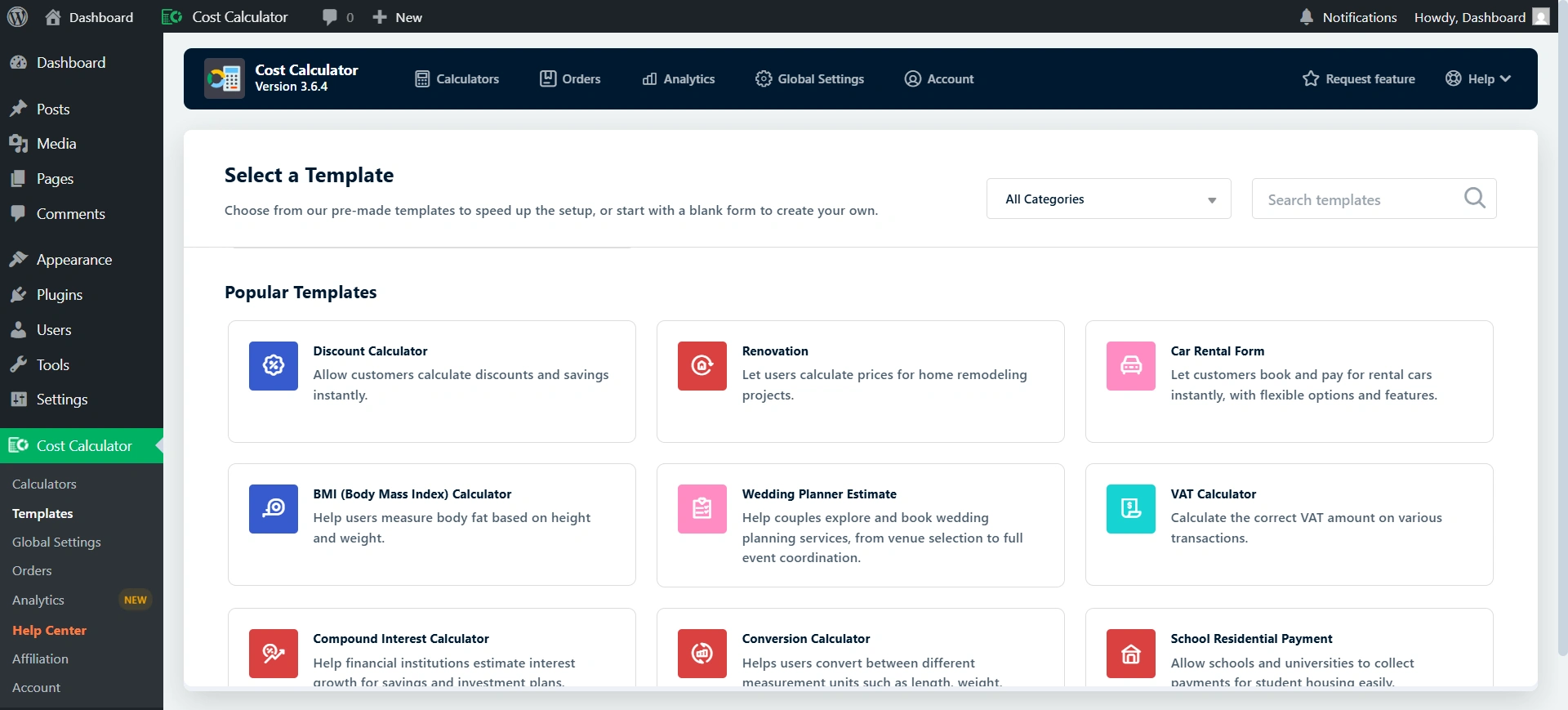
The plugin ships with prebuilt calculator templates for different use cases (services, bookings, e-commerce, etc.), which speeds up setup.
You can also customize the look colors, fonts, layout orientation (horizontal/vertical) to match your site’s design.
Free version available for simple needs
Even the free version offers unlimited forms, a powerful calculator builder, basic form elements, and support for page builders, which might be enough for many simple use-cases.
Key Features of Cost Clautor Builder

This plugin goes far beyond simple math. Its feature set is robust enough to handle virtually any pricing scenario a modern business could throw at it.
The Conditional System
This is, hands down, the star of the show. The Conditional System allows you to show, hide, or disable specific fields based on user input in other fields.
I found this crucial for creating truly dynamic and user-friendly forms. It prevents information overload and guides the customer efficiently through the quoting process, making the resulting estimation far more accurate.
Advanced Field Types
The variety of input fields is excellent. It includes standard fields like Quantity, Dropdown, and Checkbox, but the Pro version shines with:
- Repeater Field: The repeater field allows customers to determine how many items or people will be included in one transaction across multiple forms.
- Image Checkbox & Radio: Using images instead of text options is an excellent way to enhance both the visual appeal of a form and provide a better user experience with checkboxes/radio buttons.
- Geolocation Element: Allows calculations based on distance (point A to point B) or location selection, which is vital for delivery or rental services.
PDF Entries and Email Quotes
Once a customer has submitted an order after finishing their calculation(s), the plugin allows for easy generation of a professional looking PDF invoice, which the site owner appreciates because the PDFs are automatically saved and custom quotes can be generated and emailed to customers immediately.
Building a Calculator: Step-By-Step
The actual process of building a calculator is surprisingly streamlined. You can choose one of the pre-made templates to get a head start, or you can build one from scratch. Here’s how the process generally flows:
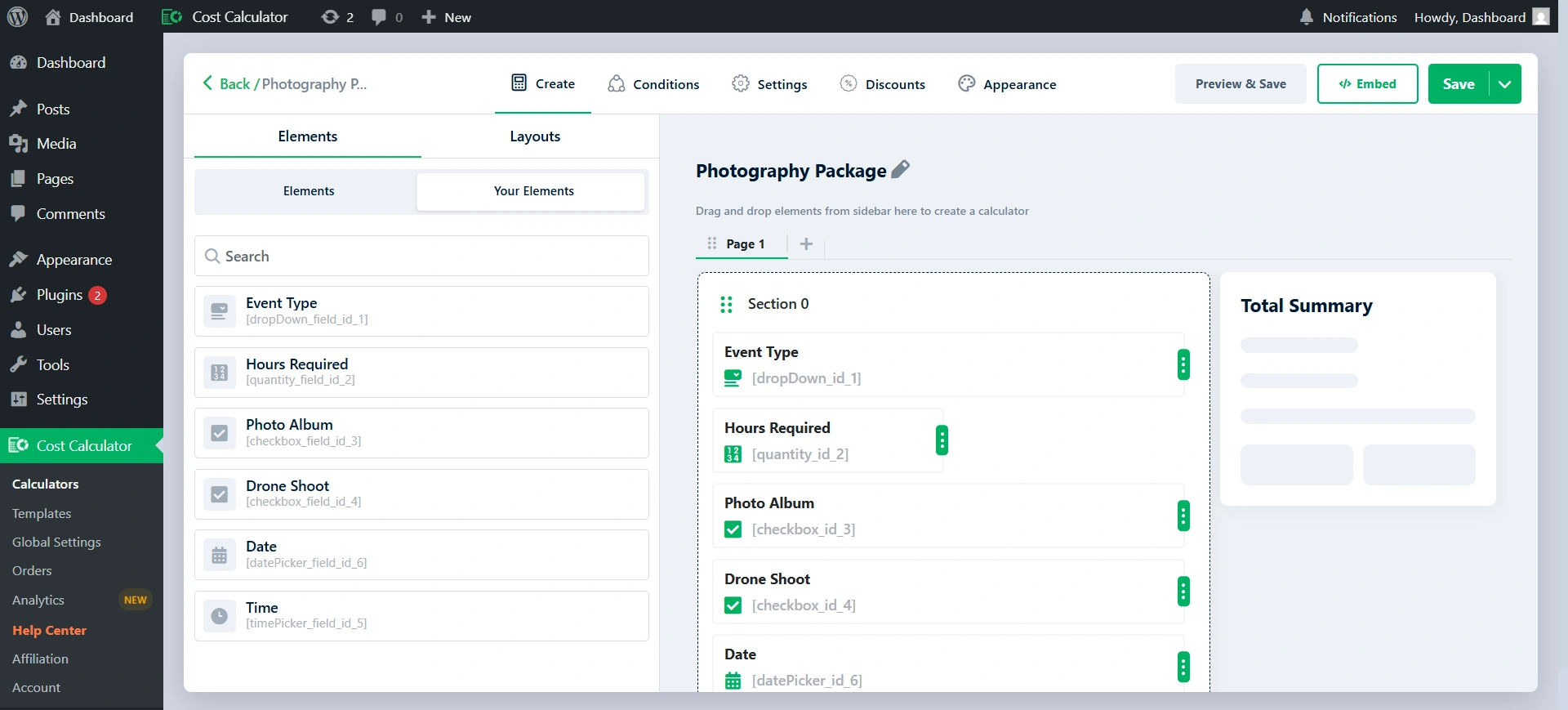
- Select Elements: To begin using the plugin, drag and drop the desired input elements onto the canvas.
- Define Variables and Values: After each element has been added to your canvas, set its label. Give it options (if applicable), and most importantly, specify its unit value. For every element you add, the plugin gives it a corresponding letter.
- Set the Formula: To establish your pricing formula, drag the Total element onto your pricing form and click on the Formula Editor icon. Each element will have a corresponding color-coded background that allows you to see if there are any syntax errors in your formula.
- Apply Conditional Logic (Optional but Powerful): You can define the conditional rules for the Conditional System in a separate tab.
- Style and Publish: Finally, style the price calculator according to your website theme by changing its colors and fonts to fit into a vertical/horizontal layout. Once styled, you will be able to embed it anywhere on your website using a short code.
This is what I made using the cost calculator.
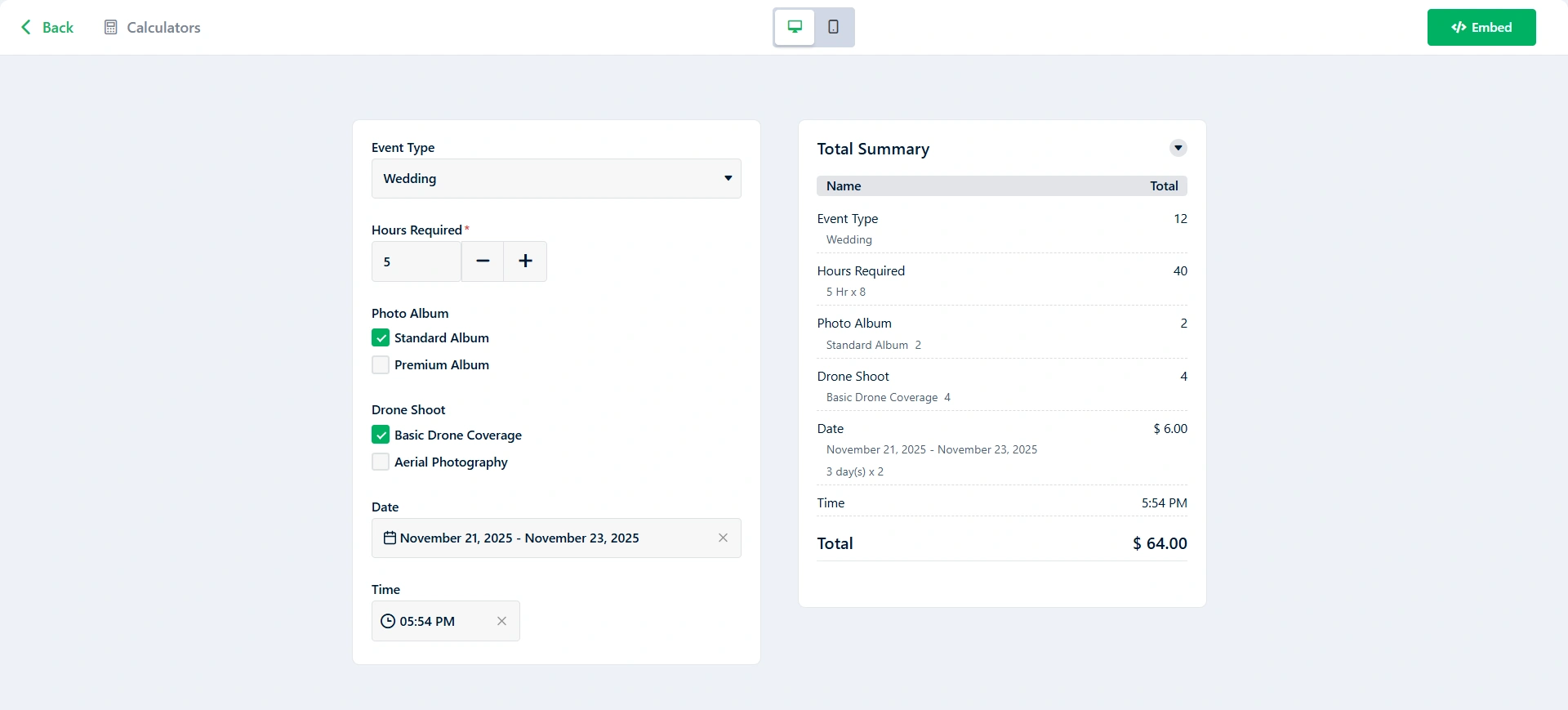
The combination of the visual builder and the simplified formula syntax makes the initial build fast, allowing you to focus on getting your complex pricing logic correct rather than fighting with the interface.
Areas for Improvement
A few areas that I felt could be improved.
- Pre-defined Formula Snippets: The formula editor is powerful, but it would be easier for beginners if it included simple helper buttons for common functions, like Round Up, Round Down, or Calculate Tax.
- Missing ‘Undo/Redo’ Functionality: The builder lacks standard ‘Undo’ and ‘Redo’ buttons. If a user accidentally deletes an element, moves a block, or changes a field value incorrectly, they must manually revert or recreate the change, which can be frustrating.
Pricing Plan
The Cost Calculator Plugin offers a Free Starter plan and three tiered Annual Pro Plans (Individuals, Freelancers, Agencies).
Choosing a paid plan gives users access to All Pro Features, which significantly boost functionality for lead generation and e-commerce.

Cost Calculator Builder provides Plans based on the needs of various types of users. The Free Starter Plan is an excellent starting point for hobbyists or individuals needing simple calculations and includes Free Templates, Basic Functionality and Community Support.
The Individual Plan ($30 for a single site) suits Small Business Owners or individual project users because it gives access to all PRO features.
The Freelancers Plan ($48) allows Developers or Small Agencies managing multiple client websites up to 10 sites, which offers fantastic value.
The Agency Plan ($150) is suited for larger agencies or Developers creating websites at a higher volume and want the most adaptability with an Unlimited number of Sites.
Conclusion
Cost Calculator Builder by stylemixthemes is an innovative, intuitive tool enabling users to develop various pricing calculators and quote calculators without having to write a single piece of code.
The drag-and-drop functionality, advanced field capabilities, conditional logic, and WooCommerce integration allow it to be used as either a basic estimator or a multi-step quote builder.
While a few features such as undo/redo capabilities and so forth would have enhanced my experience, overall the functionality, flexibility and ease of use made me appreciate this plugin as one of the best in its category available on the WordPress platform.
In particular, it is a great option for any service providers, agencies, or businesses looking to provide their customers with immediate, accurate price estimates through their websites.
Leave a Reply