
Linguator Review: Is This the Right AI Translation Plugin for WordPress?
Multilingual websites have become essential for businesses and content creators aiming to reach a global audience. Users prefer content in their native language, and search engines reward multilingual websites with better regional visibility and improved SEO performance. By offering localized content, websites can attract international traffic and increase user engagement.
However, traditional translation workflows are often slow and difficult to manage. Manually translating pages, menus, and media while maintaining consistency can quickly become overwhelming for WordPress users. As a result, AI-powered translation tools are gaining popularity for simplifying multilingual website management. One such emerging solution is Linguator, a multilingual AI translation plugin for WordPress designed to deliver faster, more flexible translation workflows. In this review, we’ll explore how Linguator works, its key features, and whether it’s the right choice for building multilingual WordPress websites.
- What Is Linguator?
- Key Features of Linguator
- Translating Content with Linguator: How It Works
- Custom Block & Media Translation Support
- Glossary Feature: Maintaining Translation Consistency
- Language Switcher & URL Handling
- Who Should Use Linguator?
- Final Verdict: Should You Use Linguator for Your WordPress Site?
What Is Linguator?
Linguator is a completely free WordPress multilingual translation plugin designed to help website owners create and manage multilingual content using AI-powered translation technology. The plugin allows users to translate website elements, including pages, posts, navigation menus, media files, and categories or taxonomies, without relying on complex manual workflows.
Linguator supports AI translation providers such as Google Translate and Chrome’s built-in AI, enabling both automatic and manual translation options. Unlike many traditional multilingual solutions, Linguator works as a standalone plugin and does not require integration with other multilingual tools like Polylang or WPML.
Key Features of Linguator
Easy Setup Wizard
Linguator includes a guided setup wizard that helps users configure their multilingual website in minutes. During setup, users can define the default site language, select target languages, choose a URL structure for translated pages, and enable media translation. This streamlined onboarding process makes the plugin accessible even for users with limited technical experience.
AI-Powered Translation Providers
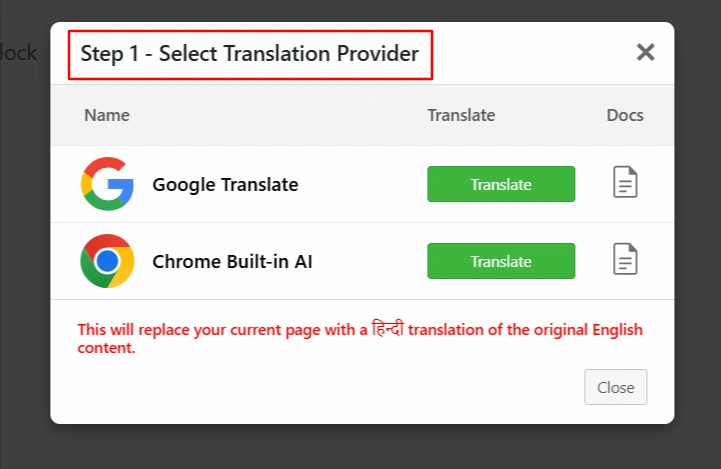
The plugin supports AI translation through Google Translate and Chrome’s built-in AI, allowing users to choose the provider that best fits their needs. Linguator supports both automatic translation for speed and manual editing for accuracy, giving users full control over the final translated content.
Bulk Translation for Faster Localization
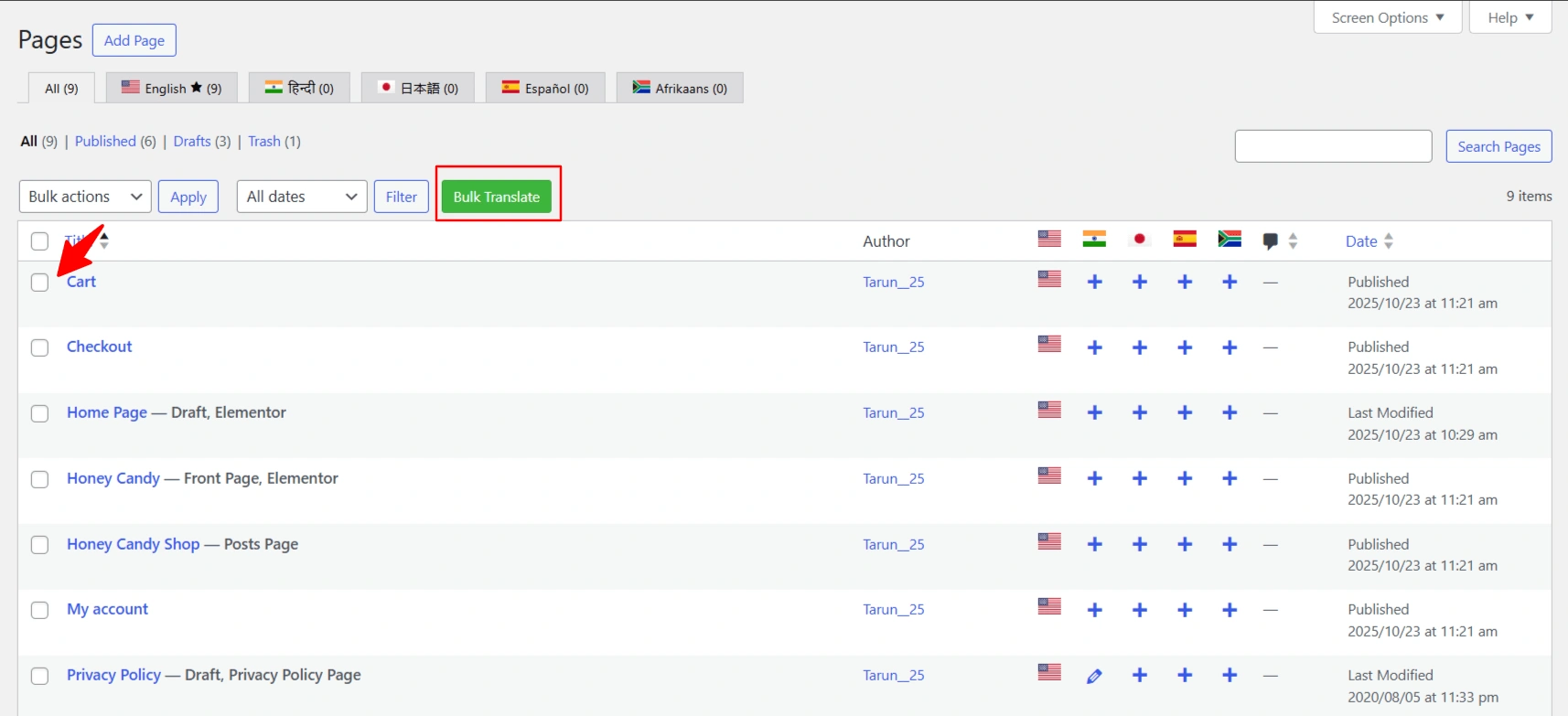
Linguator allows users to translate multiple pages, posts, categories, and taxonomies at once using its bulk translation feature. This is particularly useful for existing websites that need to be localized quickly without translating each item individually.
Inline and Selective Translation
Linguator also offers inline translation, enabling users to translate only selected text blocks or widgets. This feature is helpful when updating specific sections of a page without re-translating the entire content.

Translating Content with Linguator: How It Works
Linguator provides flexible translation workflows that support both manual and automatic translation, making it suitable for different content strategies. The plugin integrates directly with WordPress editors, allowing users to translate content without leaving their familiar editing environment.
Gutenberg Translation Support
For websites built with the Gutenberg editor, Linguator enables manual translation through dedicated language tabs within the editor. Users can create a new language version of a page or post and rewrite or paste translated content manually. For faster results, Linguator also supports automatic translation by duplicating the original content and translating it using the selected AI provider. This approach allows users to review and refine translations before publishing.
Elementor Translation Support
Linguator is fully compatible with Elementor, one of the most popular WordPress page builders. Users can access translation settings through a language icon in the Elementor editor, select a target language, and translate the page using AI-powered tools. After translation, content can be edited directly to improve accuracy, ensuring high-quality multilingual pages.
Custom Block & Media Translation Support
In addition to standard content, Linguator also addresses one of the common challenges of multilingual WordPress websites: translating custom blocks and media content. While most core Gutenberg blocks are translated automatically, third-party blocks added by plugins may require additional configuration. Linguator provides a Supported Blocks section where users can manually enable translation for unsupported custom blocks, ensuring that all page elements can be localized consistently.
Linguator also supports media translation, allowing users to translate image titles, alt texts, captions, and descriptions for each language. This feature is particularly valuable for accessibility and multilingual SEO, as search engines rely on properly localized media metadata. By extending translation beyond text content, Linguator helps maintain a fully translated and optimized multilingual WordPress website.
Glossary Feature: Maintaining Translation Consistency
One of the standout features of Linguator is its built-in glossary system, designed to ensure consistent translations across an entire WordPress website. In multilingual projects, certain brand names, technical terms, or industry-specific phrases often require precise and uniform translations. Without a glossary, these terms can be translated differently across pages, leading to confusion and inconsistency.
Linguator allows users to create glossary entries for important terms and define how they should be translated in each language. These glossary rules are automatically applied during bulk translations, helping maintain accuracy at scale. The plugin also supports importing and exporting glossary entries via CSV files, making it easier to manage terminology across multiple websites or teams. This feature is especially useful for businesses and content-heavy sites that rely on consistent messaging in multiple languages.
Language Switcher & URL Handling
A seamless language-switching experience is essential for multilingual WordPress websites, and Linguator provides flexible options to manage this effectively. The plugin includes a built-in language switcher that can be added to WordPress navigation menus, allowing visitors to easily switch between available languages. Users can customize how the switcher appears by displaying language names, flags, or a combination of both, while also hiding untranslated languages if needed.
Linguator also supports SEO-friendly URL structures for different language versions of a website. Each translated page can have its own localized URL, helping search engines properly index multilingual content. Additionally, Linguator works well with popular SEO plugins like Yoast SEO and Rank Math, ensuring translated pages maintain optimized metadata and improved search visibility.
Who Should Use Linguator?
Linguator is suitable for a variety of WordPress users, including:
- Bloggers & content creators looking to reach a global audience with multilingual content.
- Business websites that need to provide localized content for different regions.
- Agencies managing multiple multilingual projects who want consistent translations across pages and posts.
- WooCommerce store owners aim to translate product titles, descriptions, categories, and other shop content efficiently.
- WordPress users seeking AI-powered translation workflows to save time while maintaining control over content quality.
- Sites that want a standalone multilingual solution without relying on plugins like Polylang or WPML.
Final Verdict: Should You Use Linguator for Your WordPress Site?
Yes, you should definitely consider using Linguator for your WordPress website. It is a completely free, AI-powered multilingual plugin that simplifies translating pages, posts, menus, media, and categories. With support for both automatic and manual translation, bulk translation, and full compatibility with Elementor and Gutenberg, Linguator offers both speed and control. Its built-in glossary system ensures consistent terminology across your site, maintaining professional and accurate translations. Even in its beta stage, it provides a reliable, standalone alternative to traditional plugins like WPML or Polylang.
For anyone looking to create a fully translated, SEO-friendly WordPress site, Linguator is a tool you can confidently rely on. You can download and install Linguator for free from the WordPress plugin repository.
If you like this article, consider reading.
Leave a Reply