
How WooCommerce Merchants Can Handle Returns and Refunds Efficiently
Returns are an inevitable part of running a WooCommerce store. As order volumes grow, so do return requests, and without a structured process, managing returns and issuing refunds can quickly become overwhelming. Customers expect a simple return experience and fast refunds. If the workflow is manual or unclear, it can lead to delays, increased support queries, and reduced customer trust.
By setting up a clear return system and automating key steps inside WooCommerce, merchants can handle returns more efficiently and maintain a positive post-purchase experience.
Understanding Returns & RMA in WooCommerce
Before optimizing returns, it’s important to understand how they work within WooCommerce.
A return typically begins when a customer requests to send back a product due to damage, incorrect items, sizing issues, or simply a change of mind. However, behind every return is a structured process known as RMA (Return Merchandise Authorization). An RMA system allows merchants to approve or reject return requests, track the reason for the return, and monitor the product until it reaches the warehouse
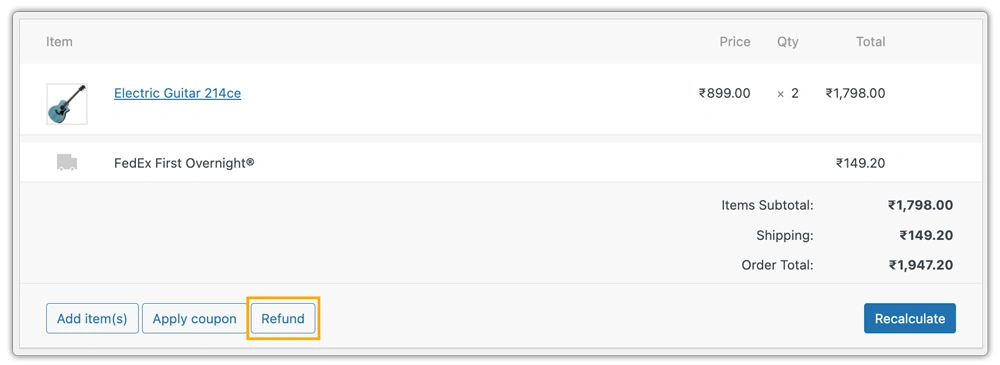
WooCommerce does not fully automate returns by default. While merchants can process refunds directly from the order page, they still need a structured workflow to handle return approvals, generate shipping labels, manage tracking updates, and communicate with customers effectively.
A proper RMA process ensures that:
- Customers know when and how to return a product
- Store owners maintain control over return approvals
- Returned items are tracked before refunds are issued
- Inventory can be restocked accurately
Without a defined RMA system, returns can become disorganized, leading to lost packages, delayed refunds, accounting mismatches, and frustrated customers. Understanding how returns and RMA workflows function inside WooCommerce is the first step toward building a more efficient, automated return strategy.
Key Challenges in Managing Returns and Refunds in WooCommerce
Managing returns and refunds in WooCommerce can become operationally complex as a store grows. While processing orders is straightforward, handling post-purchase issues requires coordination and careful financial management.
Several common challenges arise:
- Manual communication and coordination: Handling return approvals and instructions through emails can lead to confusion and delays.
- Limited shipment visibility: Without centralized tracking, it’s hard to monitor return progress and confirm delivery.
- Refund processing delays: Verifying returned items before issuing refunds can slow down the process and increase support queries.
- Inventory discrepancies: Returned products may not be restocked accurately, affecting stock management.
- Rising operational costs: Increased admin work and support tickets add to overhead expenses.
- Fraudulent or abusive returns: False damage claims, excessive returns, or returning used items can impact profitability when there are no proper validation steps.
- Lack of return data analysis: Without tracking return reasons, merchants miss opportunities to identify recurring product issues and reduce future return rates.
- Internal approval bottlenecks: When multiple teams are involved in reviewing and approving returns, response times can slow down significantly.
- Poor return status communication: Customers often feel uncertain about what is happening with their return if updates are not automated or clearly communicated.
- Warehouse processing delays: If returned products are not inspected and recorded quickly, both refunds and inventory updates are affected.
- Cash flow impact: High return volumes and refund payouts can temporarily strain revenue, especially when processes are not optimized.
Refund management also introduces financial considerations such as partial refunds, restocking deductions, and reconciliation with payment gateways. Without a structured system, these tasks can lead to accounting inconsistencies. Merchants must ensure that returns and refunds are handled in an organized manner; otherwise, customer dissatisfaction can quickly follow.
Automating Return Workflows Inside WooCommerce
To understand how to automate the return process, let’s take the example of a store using FedEx. When shipping with FedEx, merchants can use the FedEx Shipping Plugin for WooCommerce with Print Label to streamline the entire return workflow and make the process seamless.
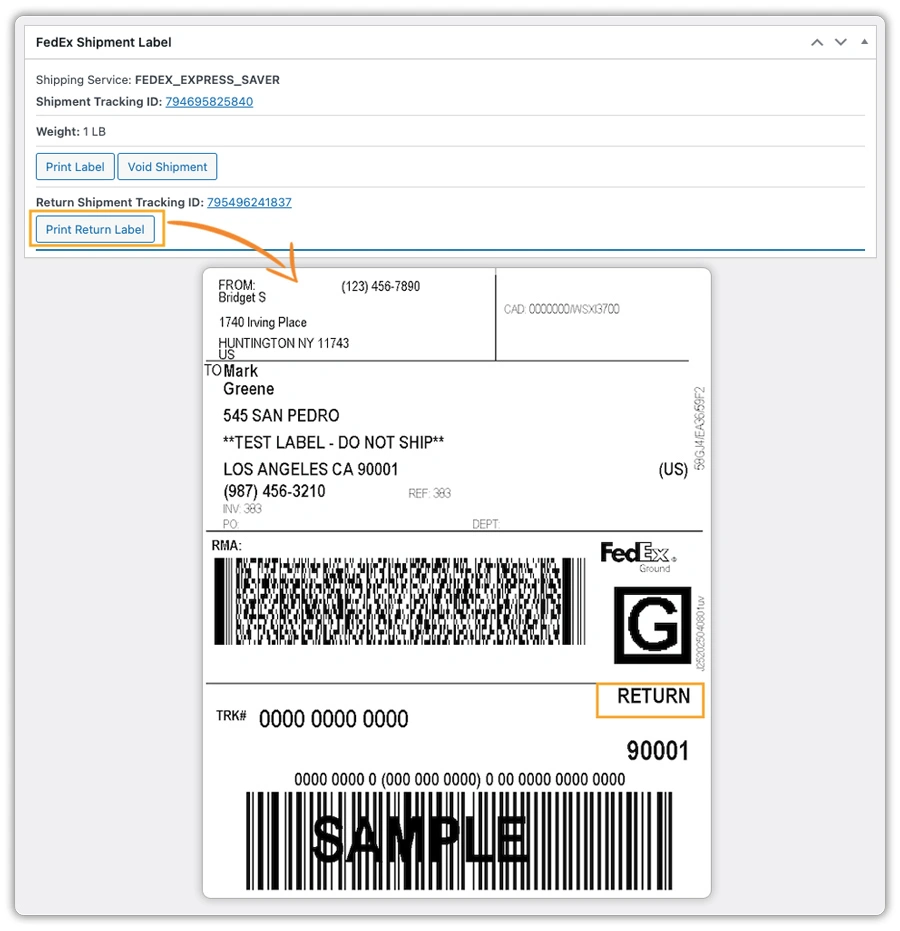
With this plugin, when a customer requests a return and it is approved, the store owner can generate a return label directly from the WooCommerce order page. The label is created using the store’s configured FedEx account details, and a tracking number is automatically generated through FedEx.
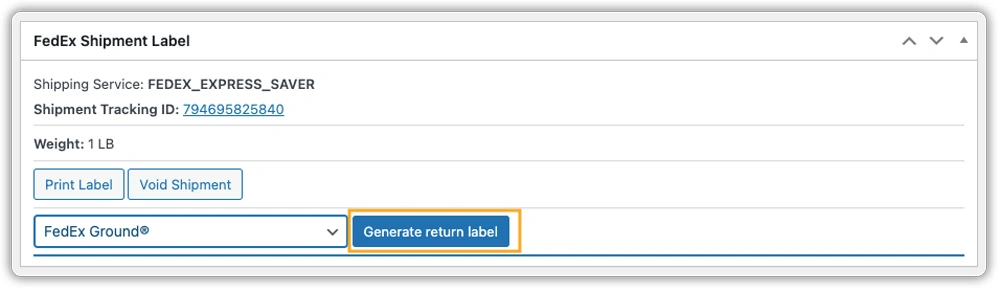
Merchants can print the return label and choose how the return label is provided:
- Include a preprinted return label inside the original shipment: This makes the return process faster and more convenient for customers. They can simply repack the item and send it back without waiting for further instructions.
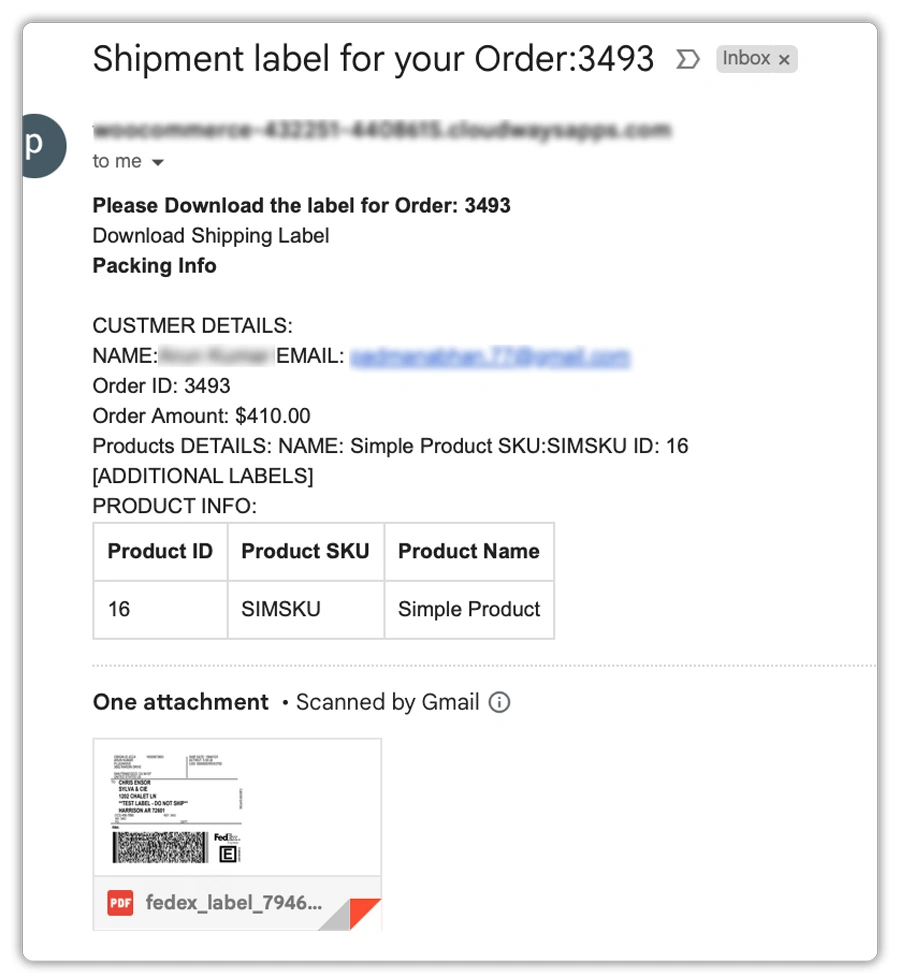
- Email the return label to the customer after approval: Once the return request is approved, the label can be emailed directly to the customer. This ensures better control over return eligibility while keeping the process clear and organized.
- Allow customers to download and print the label from their WooCommerce account: After approval, customers can access their order, download the return label, and print it themselves. This reduces manual communication and offers a smooth self-service experience.
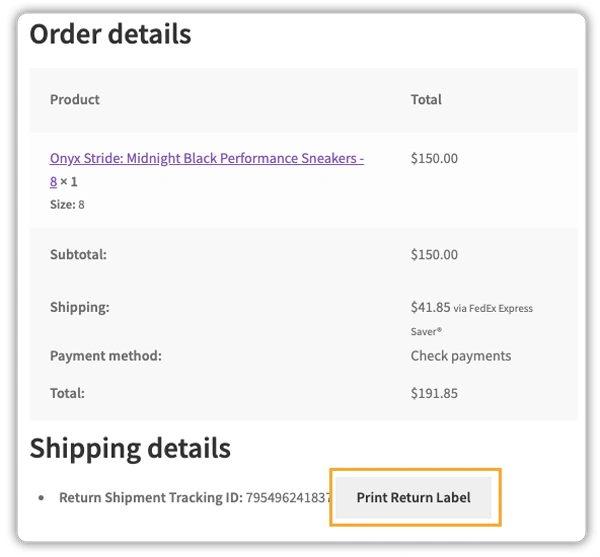
Once the returned package arrives and the product is inspected in accordance with your store’s return policy, the refund can be processed directly from the WooCommerce order page. Since the return shipment is already linked to the order, tracking visibility remains centralized and organized.
The same automation approach applies when handling UPS returns. To streamline UPS return workflows inside WooCommerce, merchants can use the WooCommerce UPS Shipping Plugin with Print Label to automate the return shipment process.
For stores operating across multiple regions, additional carriers such as USPS, Canada Post, or DHL can also be integrated using a multi-carrier solution like WooCommerce Shipping Services Plugin.
Best Practices to Reduce Return Costs and Refund Delays
An efficient return system doesn’t just improve customer experience, it also protects your margins. Here are some practical best practices to follow:
1. Create a Clear and Detailed Return Policy: Clearly define eligibility criteria, return timeframes, acceptable product conditions, and refund timelines. When customers understand the rules, unnecessary return requests and disputes decrease.
2. Approve Returns Before Issuing Labels: Instead of offering automatic returns for every request, review and approve them first. This helps prevent misuse, reduces fraudulent returns, and ensures that only valid cases proceed.
3. Inspect and Process Refunds Promptly: Delays often occur after the product reaches the warehouse. Establish an internal process and clearly assign responsibility to your team. Processing refunds promptly improves customer trust.
4. Encourage Exchanges Over Refunds: Where possible, offer product exchanges or store credit instead of direct refunds. This helps retain revenue while still satisfying customers.
5. Track Return Reasons: Analyze why customers are returning products. Common patterns, such as sizing issues or packaging damage, can reveal areas for improvement. Fixing root causes reduces future return rates.
6. Maintain Accurate Inventory Updates: Ensure returned items are restocked properly once approved. Accurate inventory prevents overselling and improves stock planning.
FAQs
WooCommerce allows merchants to process refunds directly from the order page, but it does not include a complete RMA (Return Merchandise Authorization) system by default. For structured return approvals, tracking, and automation, additional plugins are typically required.
You can create a return policy page and link it in your website footer, checkout page, and order confirmation emails. A clear policy should define return eligibility, timeframes, product conditions, and refund processing timelines.
Yes, WooCommerce supports partial refunds. Store owners can refund specific quantities or custom amounts directly from the order details page, making it easier to handle damaged items or restocking deductions.
Refund timelines depend on your payment gateway and bank processing times. While WooCommerce can initiate refunds instantly, customers may see the funds reflected within 3 – 10 business days, depending on the payment method.
You can reduce returns by providing detailed product descriptions, accurate sizing charts, high-quality images, customer reviews, and clear expectations about delivery and product usage.
Free returns can improve customer trust and conversion rates, but they may increase operational costs. Many merchants offer free returns only for defective or incorrect items, while charging for change-of-mind returns.
By default, WooCommerce does not provide advanced return tracking. However, with the right plugins, customers can receive status updates and track return shipments directly from their account dashboard.
Conclusion
Returns are no longer just a post-sale activity; they are a critical part of the overall customer experience. For WooCommerce merchants, the difference between a chaotic return process and a structured one often determines whether customers come back or look elsewhere next time.
When returns are handled efficiently, they stop being a cost center and start becoming an opportunity to reinforce trust and professionalism. A smooth return experience reassures customers that your business stands behind its products, and that confidence plays a major role in long-term growth.
If you’d like to explore solutions that help streamline WooCommerce shipping and return management, you can learn more here: WooCommerce Shipping Plugins
If you found this article informative, consider reading.
Leave a Reply